color palette
#12100E
#F2EDE6
#FF8A28
preview
readme
HEV Suit — Omarchy theme
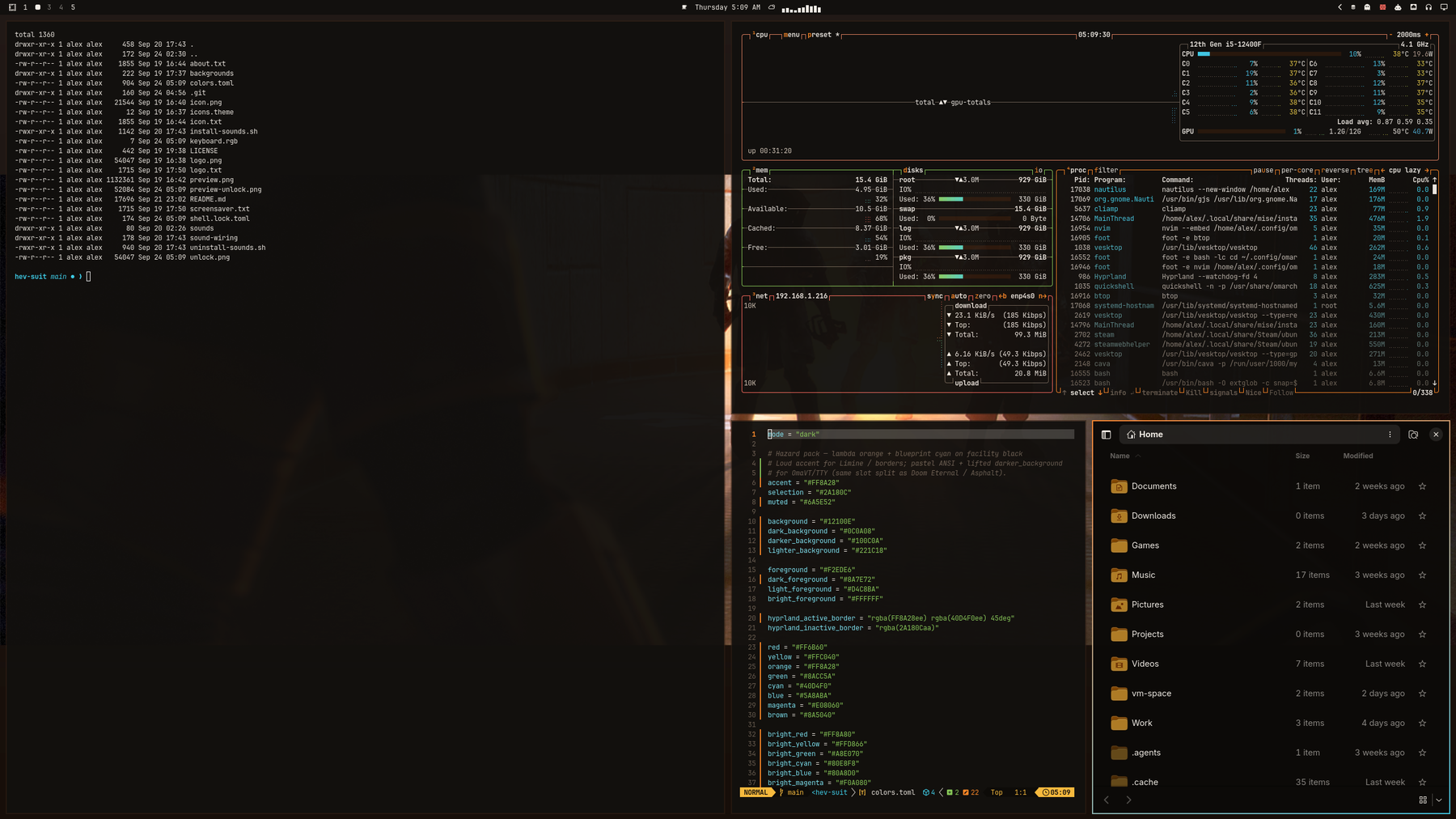
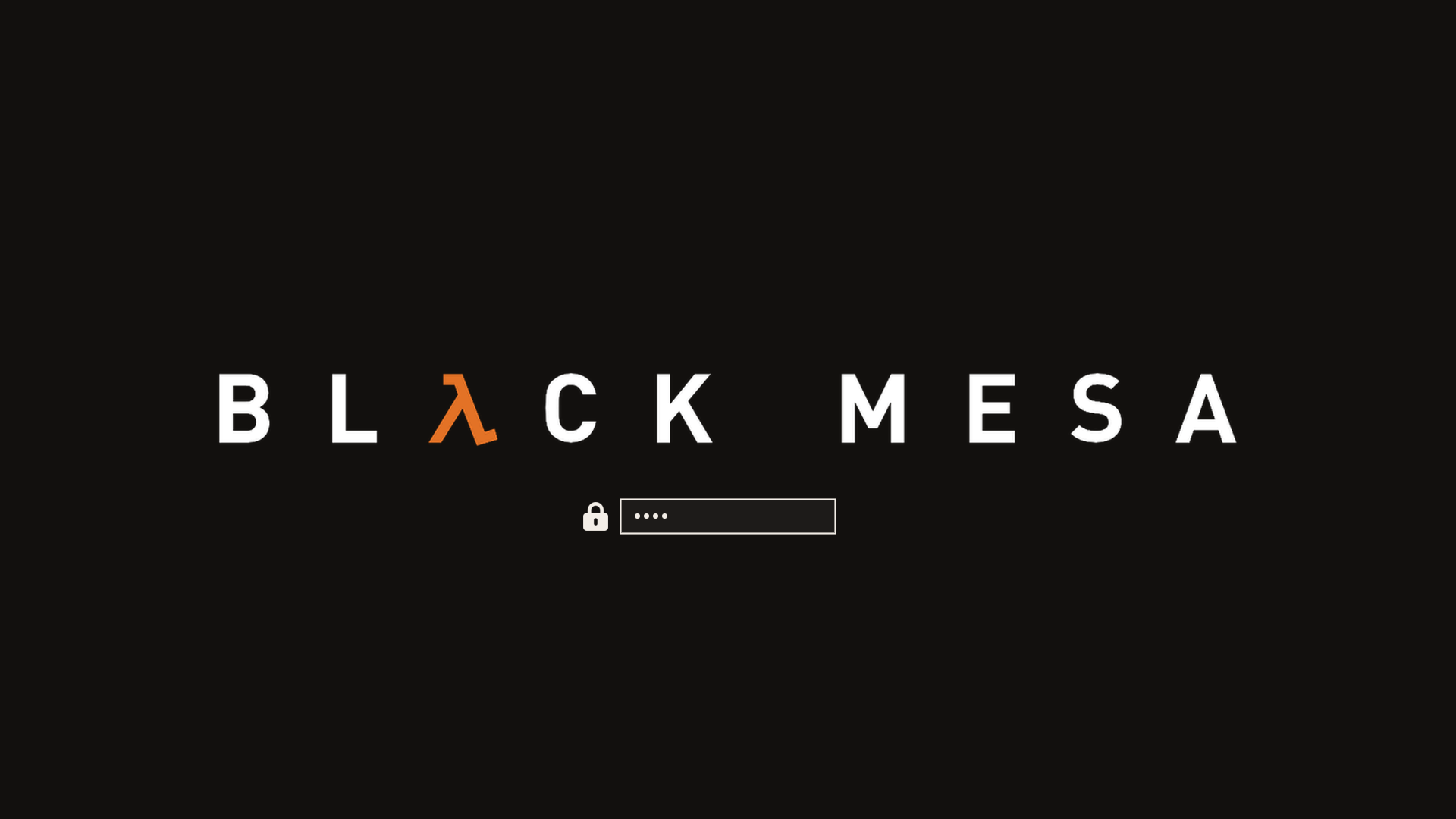
Incident report, unclassified: Freeman never clocked in for the usual Tuesday. Somewhere between the tram ride and the HEV bay the facility stood up a compositor called Hyprland, an opinionated Arch called Omarchy, and a terminal that answered in hazard orange. The resonance cascade still happened — of course it did — but the desktop held. Facility black. Blueprint cyan on the monitors. Active Hypr borders run a 45° HEV-orange → blueprint-cyan gradient (same dual-accent trick as Asphalt, Galuga, CS, Cyber Shadow, Doom 2016, Eternal, Caged, KI, Rising, Stanley, SF6, T2D & USFIV). And the suit got into the system: boot, low power, updates, wrong unlock — a lite patch of GothLady HEV lines on the desktop. Full voice still lives in Black Mesa for anyone who owns the game; some workshop notes say they could listen to her all day. Fair. Same story, better rice.
Orange-suit theme for Omarchy. Inspired by the look of Black Mesa / Half-Life — not affiliated with Valve or Crowbar Collective (see Credits below).
Adjacent, different vibe: Shiver-dev01/omarchy-black-mesa-theme is an amber phosphor CRT “Black Mesa” take (single facility-amber accent, scanline wallpapers). This pack is the game — HEV orange, blueprint cyan, Steam art, corridor zombies and all. Same building, different wing.
Omarchy derives the install folder from the repo name (omarchy-…-theme →
slug). A plain black-mesa slug would collide with that CRT pack — theme install deletes the existing folder first — so this one ships as HEV
Suit (omarchy-hev-suit-theme → hev-suit) and they can coexist.

Also in this series: Asphalt Legends, Operation Galuga, Counter-Strike, Cyber Shadow, Doom 2016, Doom Eternal, Half-Life Caged, Killer Instinct, Metal Gear Rising, Stanley Parable, Street Fighter 6, Terminator 2D: NO FATE, and Ultra Street Fighter IV.
Install
omarchy theme install https://github.com/AlxWolfenstein97/omarchy-hev-suit-theme.git
# optional — About + screensaver ASCII for this theme (skippable; see Branding)
cp ~/.config/omarchy/themes/hev-suit/about.txt ~/.config/omarchy/branding/about.txt
cp ~/.config/omarchy/themes/hev-suit/screensaver.txt ~/.config/omarchy/branding/screensaver.txt
That clones and applies the theme (omarchy-theme-set runs inside
theme install). Do not follow with another omarchy theme set — a second
set skips the first wallpaper and just wastes a switch.
Or clone into place (then you do need an explicit set):
git clone https://github.com/AlxWolfenstein97/omarchy-hev-suit-theme.git ~/.config/omarchy/themes/hev-suit
omarchy theme set "HEV Suit"
# optional branding — same as above
cp ~/.config/omarchy/themes/hev-suit/about.txt ~/.config/omarchy/branding/about.txt
cp ~/.config/omarchy/themes/hev-suit/screensaver.txt ~/.config/omarchy/branding/screensaver.txt
Already installed and just switching back later:
omarchy theme set "HEV Suit"
# optional — re-apply this theme’s About / screensaver marks
cp ~/.config/omarchy/themes/hev-suit/about.txt ~/.config/omarchy/branding/about.txt
cp ~/.config/omarchy/themes/hev-suit/screensaver.txt ~/.config/omarchy/branding/screensaver.txt
Cycle wallpapers with omarchy theme bg next.
What’s in the pack
| Asset | Role |
|---|---|
colors.toml | Palette (the real theme) |
backgrounds/ | Wallpapers |
sounds/ | Four GothLady HEV cues — optional wiring via install-sounds.sh / uninstall-sounds.sh (see How HEV system sounds work) |
unlock.png / preview-unlock.png | Plymouth unlock + picker mockup |
preview.png | Theme switcher preview |
icon.txt / logo.txt (+ about.txt / screensaver.txt) | About & screensaver ASCII branding |
icon.png / logo.png | Same marks as images (README + optional “Set From Image”) |
Branding (About / screensaver)
Optional. Omarchy’s About screen and screensaver read from
~/.config/omarchy/branding/. Shipping per-theme .txt marks isn’t original —
other Omarchy 3.x themes did it — but it’s the fast path if you want this
pack’s wordmark on idle and on About without hunting files.
Prefer the .txt files and the cp lines in Install. That’s
what you’re meant to see. Editing the text also works (Style → About /
Screensaver → Edit Text).
Skip the cp if you already have custom logos / screensaver art you care
about — or back those up first. The branding slot is really meant for your
marks (put personal art somewhere easy to reach). The Style file picker works,
but drilling into ~/.config/omarchy/themes/... is slow busywork for something
optional. Don’t feel obliged to bring mine.
The .png versions are here for the README and for a quick Style → Set From
Image try. In my experience Omarchy’s image→ASCII path is a bit thinicky on
color and boxing, so don’t expect magic from the PNGs — the hand text is the
good path.
Unlock
Style → Unlock → pick this theme (unlock.png / preview-unlock.png).
How HEV system sounds work
Extra for this theme — same spirit as the plugin extenders below: palette +
art ship by default; the VO is optional desktop wiring you opt into once.
Other themes stay quiet because the dispatcher only plays files from the
current theme’s sounds/ folder.
Lovingly voiced by Kerensa “Goth_Lady1987” Hayes, chopped / shipped here by Alex_Wolfenstein97. Full pack on Steam Workshop: GothLady’s HEV Suit Voice. This theme is a lite pack — four desktop cues. There’s a whole lot more of her if you own Black Mesa. If you don’t… why are you even here?
| File | Line | Trigger |
|---|---|---|
sounds/login.ogg | Welcome + vitals OK (welcome bits trimmed) | Desktop start |
sounds/battery.ogg | Warning: vital signs critical | Low battery (≤10%, discharging) |
sounds/update.ogg | Power restored | After omarchy update finishes (see below) |
sounds/denied.ogg | Warning: biohazard detected | Wrong password on the lock screen |
Levels are the edited export as-is (mean roughly −15 to −18 dB) — clear over quiet lofi / NCS / Omarchy Radio, not fighting a cliamp stream at 0 dB, and nowhere near the clipped in-game original HEV blast.
Exactly how each cue fires
Login — Hyprland’s stock autostart runs
sleep 2 && omarchy-hook post-bootafter the desktop comes up. That hook directory runsomarchy-sound login, whichpaplays~/.local/state/omarchy/current/theme/sounds/login.oggif present.Battery — Omarchy’s battery service polls every 30s (and on AC changes). When you’re on battery, discharging, at or below 10%, and haven’t been notified yet this discharge cycle, it runs
omarchy-battery-low, which fires thebattery-lowhooks →omarchy-sound battery.Update — stock Omarchy calls
omarchy-hook post-updatemid-pipeline: after system packages + migrations, before AUR, mise, and orphan cleanup. Official docs say the same (“after system packages and migrations”). The floating “Done — press any key” prompt (omarchy-show-done) only appears after the wholeomarchy-updateprocess exits — much later. Snapshot creation still runs up front even on a no-op / “joke” update (same reason Omarchy always snapshots before touching pkgs). There is no later hook we can use.So this theme’s
hev-sound.hookdoes not play immediately. It resolves the parentomarchy-updatePID before returning (walking/procwhile those parents still exist), thensetsids a waiter that playssounds/update.oggwhen that PID exits — roughly as press-any-key shows, after AUR/mise. Manualomarchy hook post-update(no update parent) falls back to playing right away. Empty updates still cue: Omarchy always runs the hook after confirm, same as the snapshot. Debug trail:~/.local/state/omarchy/hev-update-sound.log.Denied — stock lock has no hook. Install Lock Sound (a published
omarchy.lockclone with one extra line). Wrong password →omarchy-sound denied→ biohazard while this theme is current.
The dispatcher (~/.local/bin/omarchy-sound) is theme-agnostic: switch away
from Hev Suit and the same hooks become no-ops (missing file → exit 0, no
freedesktop ding). Switch back and the cues return. To tear the wiring down
entirely (not just go quiet), use uninstall-sounds.sh below.
Wire it once / wire it down
From this theme directory (after theme install / clone):
~/.config/omarchy/themes/hev-suit/install-sounds.sh
# tear down dispatcher + hev-sound hooks (theme + Lock Sound plugin untouched):
~/.config/omarchy/themes/hev-suit/uninstall-sounds.sh
install-sounds.sh drops ~/.local/bin/omarchy-sound and the three
hev-sound.hook files under hooks/{post-boot,battery-low,post-update}.d/.
uninstall-sounds.sh removes those same paths (and the optional update-sound
debug log). Sources live in sound-wiring/ if you want to inspect them.
Denied still needs Lock Sound — stock lock has no failure hook:
omarchy plugin add https://github.com/AlxWolfenstein97/omarchy-lock-sound.git --enable
omarchy-restart-shell
# later:
omarchy plugin remove io.github.alxwolfenstein97.lock-sound --yes
Smoke-test: omarchy-sound login / battery / update / denied.
Hook / dispatcher pattern inspired by Shiver-dev01/omarchy-black-mesa-theme (they document the wiring; this pack ships the clips + install/uninstall).
Extend further with plugins
This repo is palette + assets on purpose. Omarchy already colour-coordinates
the shell, terminals, and editor from colors.toml. The plugins below push that
idea as far as it can reasonably go — optional extenders, not required theme
baggage. Themes keep working without them; authors can stick to the snappier
stock pipeline if they prefer.
They do not depend on each other. Pick what you want; run the whole inch-a-lada if you want the desktop to feel like yours.
Why these even exist
Black Mesa sits in the same lane as Asphalt Legends — palette + assets that play nice with Omarchy’s stock theming, then optional extenders that carry the same colours farther across the desktop. Build one good theme, build good extenders, build more good themes that work as a base and with the extenders — then circle back. Same workshop energy: you’re not modding a game, you’re modding the system.
This theme’s audio (denied)
- Lock Sound —
published
omarchy.lockclone that playssounds/denied.oggon wrong password viaomarchy-sound. Required for the biohazard cue; login / battery / update only need the hooks above.omarchy plugin add https://github.com/AlxWolfenstein97/omarchy-lock-sound.git --enable
The big sweep
- Chroma — GTK3 / GTK4 / libadwaita + Qt in one hook (file manager, Document Viewer, BleachBit, File Roller, qBittorrent, qpwgraph, …). No Style picker: it paints the toolkits most apps already use, not each app by name. Longer “why / where we stop” lives in that README. Craft inspiration: Accord proved the Omarchy → libadwaita CSS bridge; Chroma is the extender this theme points people at.
One-surface Style plugins (palette previews + apply)
These sync from colors.toml across every installed theme (stock, user,
foreign). Several ship a Style carousel so you can preview the same surface
across all your themes faster than flipping by hand — even when theme-set
already keeps them in lockstep.
| Plugin | What it themes |
|---|---|
| OmaOBS | OBS Studio (real Yami Omarchy.ovt) |
| OmaCursor | Pointer / Adwaita XCursor recolor (+ optional SDDM) |
| OmaHud | MangoHud colours only — live in-game retint; Goverlay keeps metrics/layout |
| OmaBoot | Limine boot menu colours |
| OmaVT | Virtual console / TTY palette |
| OmaTTY | Console font (Terminus-first, accessibility) |
Boom-in — one paste. --enable --yes skips the per-plugin clone/enable
prompts; arm-all then arms deps + Style/theme-set + root/SDDM/DRM (no Y/n).
Omit any plugin add line you do not want; arm-all only touches what is
installed. Sudo may ask once — that is the boom, not a menu.
omarchy plugin add https://github.com/AlxWolfenstein97/chroma.git --enable --yes
omarchy plugin add https://github.com/AlxWolfenstein97/omaobs.git --enable --yes
omarchy plugin add https://github.com/AlxWolfenstein97/omacursor.git --enable --yes
omarchy plugin add https://github.com/AlxWolfenstein97/omahud.git --enable --yes
omarchy plugin add https://github.com/AlxWolfenstein97/omaboot.git --enable --yes
omarchy plugin add https://github.com/AlxWolfenstein97/omavt.git --enable --yes
omarchy plugin add https://github.com/AlxWolfenstein97/omatty.git --enable --yes
~/.config/omarchy/plugins/io.github.alxwolfenstein97.chroma/tools/arm-all-family.sh
Boom-out — one paste. Teardown + ledger pkg drop + plugin remove. Ledger drops only what we recorded pulling; may fail and stay if something else still needs the package (e.g. Goverlay after Pillow) — fine. Loud boom-in after this is enough — no tombstone purge needed (optional OCD flag lives on the plugin READMEs).
~/.config/omarchy/plugins/io.github.alxwolfenstein97.chroma/tools/wipe-all-family.shPiece-meal (not boom): one plugin’s Workshop paste — plugin add + interactive
install.sh (asks [Y/n]) — lives on that plugin’s GitHub README. Single-plugin
full wipe: …//uninstall.sh --yes.
Already solved elsewhere (gladly)
- Omacord — Vesktop / Vencord Discord
follows Omarchy themes live. No theme carousel / mockup picker: it syncs,
and that’s the right call. Chat mockups are content-shaped anyway — you
censor half the shot and still aren’t showing a true layout. I did not have
to extend the whole theming system for chat myself:
omarchy plugin add https://github.com/ASwenia/omacord --enable
Agent / desktop bridge
- OMCP — MCP desktop bridge
(themes, windows, apps, …):
omarchy plugin add https://github.com/btsouth/omarchy-omcp --enable
Browse more on the Omarchy Plugins site.
Honest stop-line: these extenders only chase places that accept colour data (or a clean conversion). Websites, Steam chrome, document paper in LibreOffice, and similar “own paint engine / remote CSS” surfaces are out of scope on purpose — documented in Chroma’s README. Unthemed beats a half-assed chase.
Taste
Colours and contrast are tuned for what I like to look at. If they feel loud or
wrong for you, fork and retune colors.toml without guilt. (Console font sizing
for low vision lives in OmaTTY, not
this theme.)
Credits / legal-ish
- Visual inspiration and reference art from Valve’s Half-Life and Crowbar Collective’s Black Mesa branding and marketing. Not affiliated with, endorsed by, or sponsored by Valve or Crowbar Collective. Just public pixels arranged into an Omarchy theme — no money, no official product.
- System VO from GothLady’s HEV Suit Voice — same credit as on Steam: voiced by Kerensa “Goth_Lady1987” Hayes, edited by Alex_Wolfenstein97. Not Valve / Crowbar audio. Theme = lite pack; the Workshop item is the full suit if you own Black Mesa.
- If Valve or Crowbar Collective hates this existing, they can say so and I’ll deal with the repo accordingly.
License
Do whatever you want with this theme pack unless Valve, Crowbar Collective (or the law) says otherwise. Fork it, recolor it, ship it in a rice. No warranty — it’s wallpaper, hex codes, and a handful of short voice cues.
The four sounds/*.ogg clips are chopped from
GothLady’s HEV Suit Voice.
I’ve obtained permission from Kerensa (“Goth_Lady1987”) Hayes to chop, ship, and
use these lines outside our usual Steam Workshop release of that pack — including
shipping them in this Omarchy theme. That permission covers this desktop use; it
doesn’t turn the VO into public-domain or grant rights to Valve / Crowbar
material.
Optional rider, from somewhere near Sector C: if you had fun with this theme,
you are hereby contractually obligated (in the soft, mute-scientist sense of
the word) to mail [email protected] and tell him so. I hear he reads
his mail. He might even answer before the next alien invasion. Or not. He
should approve it anyway — his hardware runs on Linux. The G-Man neither
confirms nor denies.