color palette
#0F0F12
#E8E2D4
#E9B44C
#F6F1E6
#2A2620
#F6F1E6
#0F0F12
#D76851
#5BA160
#CA9437
#4B95C9
#A57FBF
#5FB5A2
#E8E2D4
#4A4438
#EA8B71
#8DC672
#F4E0A6
#7FB4E0
#C7A6DB
#78C5AD
#F6F1E6
preview
readme
Glowing City — an Omarchy theme
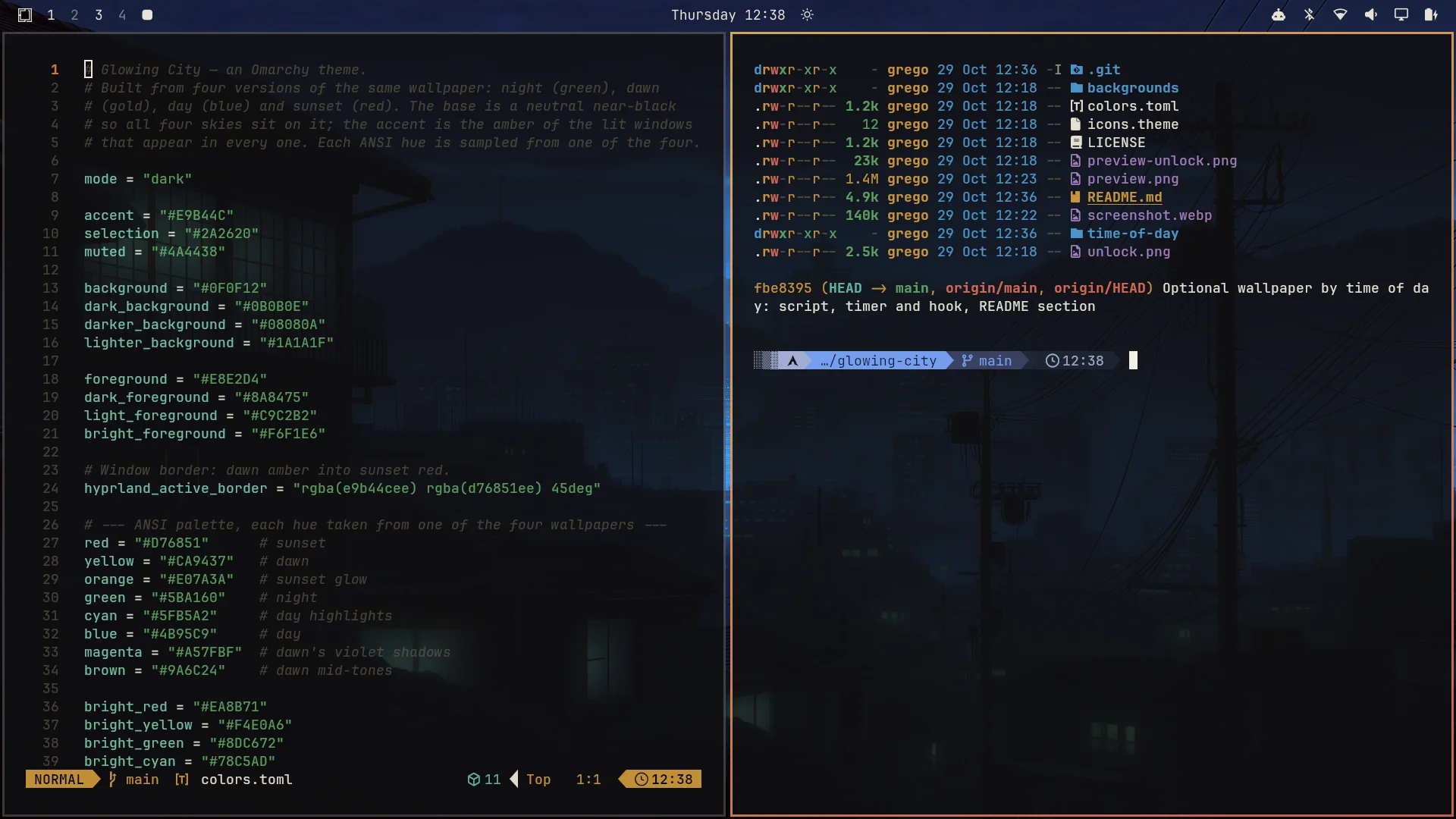
An Omarchy theme built around one wallpaper in four lights: night (green), dawn (gold), day (blue) and sunset (red). A neutral near-black base, warm lamplight text, and an amber accent taken from the lit windows that glow in every one of them.
The idea
The four wallpapers share everything except the sky: black rooftops and power lines, a city in the haze, and lamp-lit windows. The theme is built from what they share, so all four look at home on it:
- Base: a neutral near-black (
#0F0F12). A green or red tint would clash with half the set. - Text: warm lamplight off-white (
#E8E2D4). - Accent: window amber (
#E9B44C), used for the bar, highlights and the unlock screen. - Window borders: a gradient from dawn amber to sunset red.
A terminal palette from the wallpapers
Every ANSI colour is sampled from one of the four images, so eza/ls,
git, syntax highlighting and TUIs look like part of the set:
| Colour | From | Normal / bright |
|---|---|---|
| green | night | #5BA160 / #8DC672 |
| blue | day | #4B95C9 / #7FB4E0 |
| cyan | day's highlights | #5FB5A2 / #78C5AD |
| red | sunset | #D76851 / #EA8B71 |
| orange | sunset glow | #E07A3A |
| yellow | dawn | #CA9437 / #F4E0A6 |
| magenta | dawn's violet shadows | #A57FBF / #C7A6DB |
| brown | dawn's mid-tones | #9A6C24 |
Folder icons: Yaru-yellow.
A day in four wallpapers
The backgrounds are numbered so cycling them runs through a day, starting at night (the default when you switch to the theme):
1-glowing-city-night.jpg— the original green2-glowing-city-dawn.jpg— honey-gold morning3-glowing-city-day.jpg— blue haze4-glowing-city-sunset.jpg— red evening
Cycle them with Super+Ctrl+Space or omarchy theme bg next.
Wallpaper by time of day (optional)
The time-of-day/ folder switches the wallpaper by itself, so the city
follows the real day:
| From | Wallpaper |
|---|---|
| 06:00 | Dawn |
| 12:00 | Day |
| 18:00 | Sunset |
| 00:00 | Night |
A systemd user timer runs at those four times, and two Omarchy hooks run
it when you switch to the theme and when you log in, so the right sky is
up at once. If the laptop was asleep or off at a switch time, the timer
catches up when it comes back. It does nothing while another theme is
active, and Super+Ctrl+Space still works: a hand-picked wallpaper stays
until the next switch time.
Set it up after installing the theme:
cd ~/.config/omarchy/themes/glowing-city/time-of-day
install -Dm755 glowing-city-time ~/.local/bin/glowing-city-time
install -Dm644 -t ~/.config/systemd/user glowing-city-time.service glowing-city-time.timer
omarchy hook install theme-set hook-glowing-city-time
omarchy hook install post-boot hook-glowing-city-time
systemctl --user daemon-reload
systemctl --user enable --now glowing-city-time.timer
glowing-city-time
To change the times, edit the hours in ~/.local/bin/glowing-city-time
and the OnCalendar line in ~/.config/systemd/user/glowing-city-time.timer,
then run systemctl --user daemon-reload.
To turn it off:
systemctl --user disable --now glowing-city-time.timerInstall
omarchy theme install https://github.com/ggregoro/omarchy-glowing-city-theme
omarchy theme set "Glowing City"
Or clone it manually:
git clone https://github.com/ggregoro/omarchy-glowing-city-theme \
  ~/.config/omarchy/themes/glowing-city
omarchy theme set glowing-city
Boot and login screen
The theme carries a matching unlock screen: Omarchy's pixel OMARCHY
logo in window amber on the theme's near-black, with lamplight text. It
styles both the boot splash and the login screen, and it is listed in
Omarchy's unlock screen picker. To apply it by hand:
omarchy plymouth set-by-theme glowing-cityIt asks for your password and rebuilds the boot image, so give it a few
seconds. omarchy plymouth reset puts Omarchy's default back.
Tweaking
Edit colors.toml, then re-run omarchy theme set glowing-city.
Everything else — terminal colours, Hyprland borders, the bar, btop,
Neovim — regenerates from it.
Credits & licensing
The original green wallpaper comes from the Osaka Jade theme that ships
with Omarchy; the dawn, day and sunset versions are recolours of it. The
unlock logo is Omarchy's own, recoloured. Theme files (colors.toml,
icons.theme, this README) are MIT-licensed — see LICENSE.