omarchy themes

color palette

background #08090d
foreground #c8d2e6
accent #50dcc8
cursor #50dcc8
selection background #1c2740
selection foreground #c8d2e6
color0 #08090d
color1 #dc5050
color2 #50c878
color3 #dcb43c
color4 #3fc4de
color5 #9664dc
color6 #50dcc8
color7 #c8d2e6
color8 #3a4250
color9 #ec6a88
color10 #7ee8a8
color11 #fab795
color12 #6fb0e8
color13 #b98ae8
color14 #6be4e6
color15 #e8f7f4

preview

~/ghostwire
┌──────────────────────Hardware──────────────────────┐
 PC: omarchy-host
│ ├: x86_64 (8 cores) @ 4.00 GHz
│ ├: Integrated Graphics
│ ├󱄄: 1920x1080 @ 60 Hz
│ ├󰋊: 120 / 500 GiB (24%)
│ ├: 8 / 16 GiB (50%)
└ └󰓡 : 0 / 4 GiB (0%)
└────────────────────────────────────────────────────┘
┌──────────────────────Software──────────────────────┐
 OS: Omarchy 3.6.0
│ ├󰘬: master
│ ├󰔫: stable
│ ├: linux-arch
│ ├: Hyprland (Wayland)
│ ├: ghostty
│ ├󰏖: 1024 (pacman)
│ ├󰸌: Ghostwire
└ └: JetBrainsMono Nerd Font (9pt)
└────────────────────────────────────────────────────┘
┌─────────────────Age / Uptime / Update───────────────┐
󱦟 OS Age: 0 days
󱫐 Uptime: 2 hours, 13 mins
 Update: Today
└────────────────────────────────────────────────────┘
user@omarchy:~ $

readme

Ghostwire — Omarchy Theme

Ghostwire preview

A dark teal/purple hacker theme built from a hooded-figure-at-a-laptop wallpaper and unified with the color palette used in the torjet TUI project, so terminal, shell chrome, editor, browser, and lock screen all read as one identity.

This follows Omarchy's real theme system: a single colors.toml that Omarchy auto-generates into the terminal, Hyprland, Waybar, Hyprlock, Mako, btop, Walker, SwayOSD, Chromium, etc. — no per-app files needed for those.

Colors for

alacritty · btop · chromium · hyprland · hyprlock · icons · mako · neovim · swayosd · walker · waybar · ghostty · kitty · vscode · firefox · zen · discord (vencord) · fish · fzf · superfile · zed · steam

Palette

RoleHexRoleHex
background#08090dcolor4 (blue)#3FC4DE
foreground#C8D2E6color5 (magenta)#9664DC
accent/cursor#50DCC8color6 (cyan)#50DCC8
color1 (red)#DC5050color2 (green)#50C878
color3 (yellow)#DCB43Ccolor8 (dim)#3a4250

Install on Omarchy

Simplest — install via URL:

omarchy-theme-install https://github.com/vispobish01-netizen/omarchy-ghostwire-theme

or from the menu: Super + Alt + SpaceInstall > Theme → paste that same URL.

Either way Omarchy clones the repo, regenerates terminal (Kitty/Ghostty/ Alacritty), Hyprland, Waybar, Hyprlock, Mako, btop, Walker, and SwayOSD colors from colors.toml automatically, sets backgrounds/ghostwire.png as your wallpaper, and the native Hyprlock unlock screen picks up unlock.png (see Lock screen below).

Manual / local copy of this folder:

mkdir -p ~/.config/omarchy/themes
cp -r ghostwire-theme ~/.config/omarchy/themes/ghostwire
omarchy-theme-set ghostwire

Then Super + Alt + SpaceStyle > Theme → select Ghostwire.

Getting it listed publicly: the official route is pinging @tahayvr on the Omarchy Discord (#omarchy) to get added to the Extra Themes manual page. Third-party galleries like omarchythemes.com appear to mirror repos tagged with the omarchy-theme GitHub topic — add that topic to the repo once it's public.

Screenshots

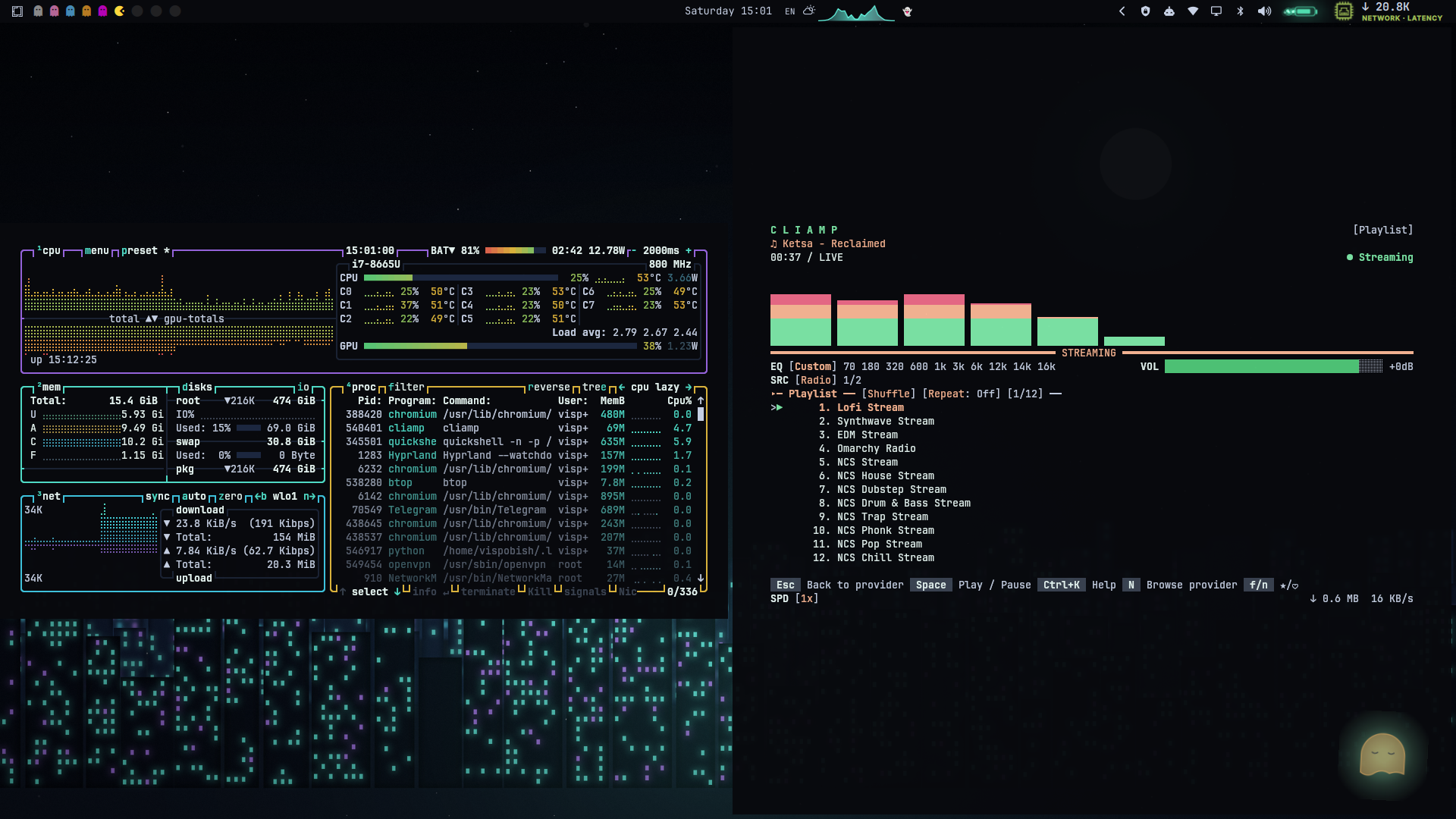
fastfetchbtop + music player
fastfetch — hardware/software summarybtop + a streaming-radio widget

yazi file manager + launcher menu yazi file manager, the Omarchy launcher's Go… menu (cyan→purple gradient border), and the neural-mesh background behind a LazyVim splash screen.

What's inside

  • colors.toml — the 22 required color keys Omarchy templates everything from

  • preview.png — desktop preview for the theme gallery / listing

  • unlock.png + preview-unlock.png — native Hyprlock unlock screen image and its preview, shown under Style > Unlock

  • backgrounds/ — sixteen wallpapers, cycle between them with Super + Ctrl + Space:

    • ghostwire.png — the original hooded-figure-at-a-laptop wallpaper (default)
    • ghostwire-the-watcher.png — a large hooded silhouette back-lit by a noise-textured cyan/purple aurora halo, starfield above, faint laptop-glow at the base
    • ghostwire-neon-skyline.png — layered cyberpunk city silhouette (three depth bands), hundreds of lit cyan/purple windows, a soft-glow moon, stars
    • ghostwire-code-rain.png — Matrix-style falling glyph columns (real monospace characters), bright white leading char + fading cyan/purple trail
    • ghostwire-aurora-peaks.png — low-poly mountain ridgelines under noise-warped cyan/purple/blue aurora ribbons and a starfield, cyan rim-light on the front ridge
    • ghostwire-circuit-drift.png — glowing PCB-style traces (with real bloom) branching outward from a central cyan hub, cyan/purple, starfield background
    • ghostwire-data-horizon.png — synthwave-style perspective grid floor with a banded yellow/red/purple sun glowing on the horizon
    • ghostwire-nebula-veil.png — soft, dark cyan/purple nebula clouds (real fractal noise) drifting behind a dense starfield
    • ghostwire-shattered-glass.png — Voronoi-based low-poly glass facets with glowing cyan/purple crack lines near the center
    • ghostwire-radar-sweep.png — concentric radar rings, crosshair, a rotating cyan sweep wedge with real falloff, and glowing green/purple blips
    • ghostwire-glitch-scan.png — horizontal scanline bands with real pixel-shift and RGB-channel-split glitches, cyan/purple accent lines, CRT scanline texture
    • ghostwire-wireframe-globe.png — a tilted 3D wireframe globe (lat/long great-circles with front/back depth shading), glowing cyan, starfield backdrop
    • ghostwire-neural-mesh.png — a three-layer organic node-link network (nearest-neighbour graph) spread across the full frame, purple/blue/cyan by depth
    • ghostwire-pulse-grid.png — three oscilloscope waveforms with pulse spikes over a faint grid, cyan/purple/blue traces, a sweeping cyan cursor line
    • ghostwire-signal-drift.png — hundreds of flow-field particle streams drifting left to right, cyan/purple/blue with bright leading heads
    • ghostwire-orbit-rings.png — four tilted elliptical orbits around a glowing cyan nucleus, one satellite node per orbit, starfield backdrop

    All sixteen are procedurally generated to match the palette — no external images, so no licensing to worry about. The fifteen generated ones use real fractal (simplex) noise, layered bloom/glow, and a shared palette-aware toolkit rather than flat gradients, so they hold up at full brightness.

  • icons.theme — sets file-manager icons to Yaru-purple to match the accent

  • btop.theme — hand-tuned btop theme (not the auto-generated one): purple/cyan/blue/yellow box outlines per panel, green→yellow→red load gradients, cyan→blue→purple network/process gradients. Drop-in — Omarchy keeps hand-written per-app files as-is instead of regenerating them from colors.toml.

  • neovim.lua — self-contained Neovim colorscheme (:colorscheme ghostwire), no plugin dependency. Covers core UI, syntax, diagnostics, Treesitter, Telescope, and nvim-tree/neo-tree highlight groups. Usage:

    mkdir -p ~/.config/nvim/colors
    cp neovim.lua ~/.config/nvim/colors/ghostwire.lua

    then :colorscheme ghostwire (or vim.cmd.colorscheme("ghostwire") in your config).

  • lock-design/ — a bonus, non-native glitch-clock lock screen (Ghostwire.qml, see lock-design/INSTALL.md) for the third-party "Lock Screen Explorer" Hyprlock plugin. This is separate from the native unlock.png above — install it only if you already use that plugin.

Hand-tuned extras beyond what colors.toml auto-generates (Omarchy keeps any file a theme ships instead of templating it — see Making your own theme):

  • gtk.css — GTK4/libadwaita apps (Nautilus, Settings, Text Editor). Omarchy's auto-template list covers terminal/Hyprland/Waybar/btop/etc but not GTK apps, so this fills a real gap rather than just adding polish.
  • waybar.css — rounded pill workspaces/modules, cyan active-workspace fill, per-module color coding (cpu=blue, mem=purple, clock=cyan), blinking red on critical battery.
  • walker.css — glass panel launcher, cyan caret/selection, purple keybind chips. Selector IDs follow Walker's default widget tree — check GTK_DEBUG=interactive walker if your version differs.
  • mako.ini — per-urgency border colors (dim/cyan/red), rounded glass-panel notifications, network/mount category accents.
  • swayosd.css — rounded OSD popup, cyan progress fill, purple for capslock, red for muted.
  • cava_theme — audio visualizer bars in the cyan→blue→purple identity gradient. Merge into ~/.config/cava/config.

These six are genuine hand-written overrides (not just re-exports of colors.toml), so an omarchy theme install from a git copy of this repo would keep all of them as-is.

Shell, editor, browser, chat

  • starship.toml — cross-shell prompt: purple OS/user segment, dark directory pill, cyan git branch, yellow git status, cyan/red success/error arrow, plus language-version segments (node/python/rust/go) in accent colors. Install: cp starship.toml ~/.config/starship.toml (or symlink it so it follows theme switches).
  • fastfetch.jsonc + ghostwire-ascii.txt — a hand-drawn block-art Ghostwire logo (cyan outline, purple shading, bright eyes) with a module list tuned for a Hyprland/Omarchy box. Install:
    mkdir -p ~/.config/fastfetch
    cp fastfetch.jsonc ghostwire-ascii.txt ~/.config/fastfetch/
    then fastfetch --config ~/.config/fastfetch/fastfetch.jsonc (or overwrite your default config.jsonc).
  • vscode-theme/ — a real, standalone VS Code theme extension (not just a pointer to someone else's marketplace theme): full tokenColors + workbench colors, covering editor, terminal ANSI colors, git decorations, and more. Install locally:
    cp -r vscode-theme ~/.vscode/extensions/ghostwire-theme
    then reload VS Code and pick Ghostwire from the theme picker. vscode.json at the theme root is Omarchy's normal pointer format, but Omarchy's auto-installer expects a marketplace extension id — since this one is local-only, omarchy-theme-set will try and fail to auto-install it; the manual copy above is the reliable path unless you later publish the extension yourself.
  • chromium.theme13,17,23 (the RGB form of #08090d), Omarchy's format for theming Chromium/Chrome/Edge/Brave via managed policy.
  • firefox/userChrome.css + firefox/userContent.css — recolors toolbar, tabs, URL bar, and Firefox's own pages (new tab, reader mode, PDF viewer). Needs toolkit.legacyUserProfileCustomizations.stylesheets = true in about:config, then both files go in /chrome/.
  • vencord.theme.css — Discord (via Vencord) recolored using Discord's CSS variables, so it survives Discord updates. Two selectors near the bottom target Discord's hashed classnames (selected-server bar, badges) and can go stale on a Discord update — if the accents on those two elements stop applying, just delete those two rules; the :root variables (which cover nearly everything) aren't affected. Install: Vencord Settings → Themes → drop the file in your themes folder → enable it.

Explicit configs (beyond colors.toml auto-templating)

Omarchy auto-generates terminal/Hyprland/Hyprlock/Waybar/etc from colors.toml, so these aren't required — but shipping them explicitly gives finer control (opacity, borders, custom Hyprlock layout) than the generic template, matching what the more detailed community themes ship.

  • alacritty.toml, kitty.conf, ghostty.conf — explicit terminal color + opacity configs. Merge into each app's own config, or point the app at ~/.config/omarchy/current/theme/ via an import/include line.
  • hyprland.conf — explicit border gradient (cyan→purple), rounding, blur, and a custom bezier/animation set, instead of the generic template.
  • hyprlock.conf — a hand-built native Hyprlock layout: large centered clock, date line, the "state: you are not here" easter egg, and a styled input field (cyan outline, purple capslock indicator, red fail state) — not just a background swap. Copy to ~/.config/hypr/hyprlock.conf.
  • colors.fish + fzf.fish — fish shell syntax-highlight colors and fzf's FZF_DEFAULT_OPTS. Merge into ~/.config/fish/config.fish or source them from there.
  • superfile.toml — theme for the Superfile terminal file manager. Copy to ~/.config/superfile/theme/ghostwire.toml and set theme = "ghostwire" in Superfile's config.toml. Superfile's theme keys have changed across versions — if a key is silently ignored, check spf's current theme docs.
  • zed.json — a full Zed editor theme (editor, terminal ANSI colors, syntax highlighting). Copy to ~/.config/zed/themes/ghostwire.json, then pick Ghostwire from Zed's theme selector.
  • steam.css — accent colors for a Steam client CSS loader such as Millennium. Steam's internal class names shift between client updates, so treat this as a starting point rather than a guaranteed drop-in.
  • zen.css — a pointer file: Zen Browser uses the same userChrome.css/userContent.css mechanism as Firefox, so the actual rules are the firefox/ files above — copy both into the Zen profile's chrome/ folder. Zen's own accent-color setting (native tab sidebar, workspaces) is separate from userChrome and should be set to #50dcc8 manually in Zen's settings.

Notes

  • Cursor and accent are both set to the cyan (#50DCC8) identity color.
  • color5/color12 lean toward the purple end of the wallpaper's gradient.
  • preview.png, preview-unlock.png, unlock.png, and the two new backgrounds (ghostwire-the-watcher.png, ghostwire-aurora-peaks.png) are freshly generated procedural art matching this palette — no external or AI-photoreal source images are bundled, to keep the repo license-clean.

License

MIT — see LICENSE. Free to use, modify, and redistribute.