color palette
#110e0e
#e4e0dd
#c96f75
#f8f7f6
#d4545c
#110e0e
#110e0e
#d16168
#d98364
#cf777d
#d06269
#d26a71
#d7b29a
#e4e0dd
#504b55
#edc0c3
#f7e4d4
#efd2d4
#ecc0c3
#efc8cb
#f8e8dd
#f8f7f6
preview
readme
Emberveil
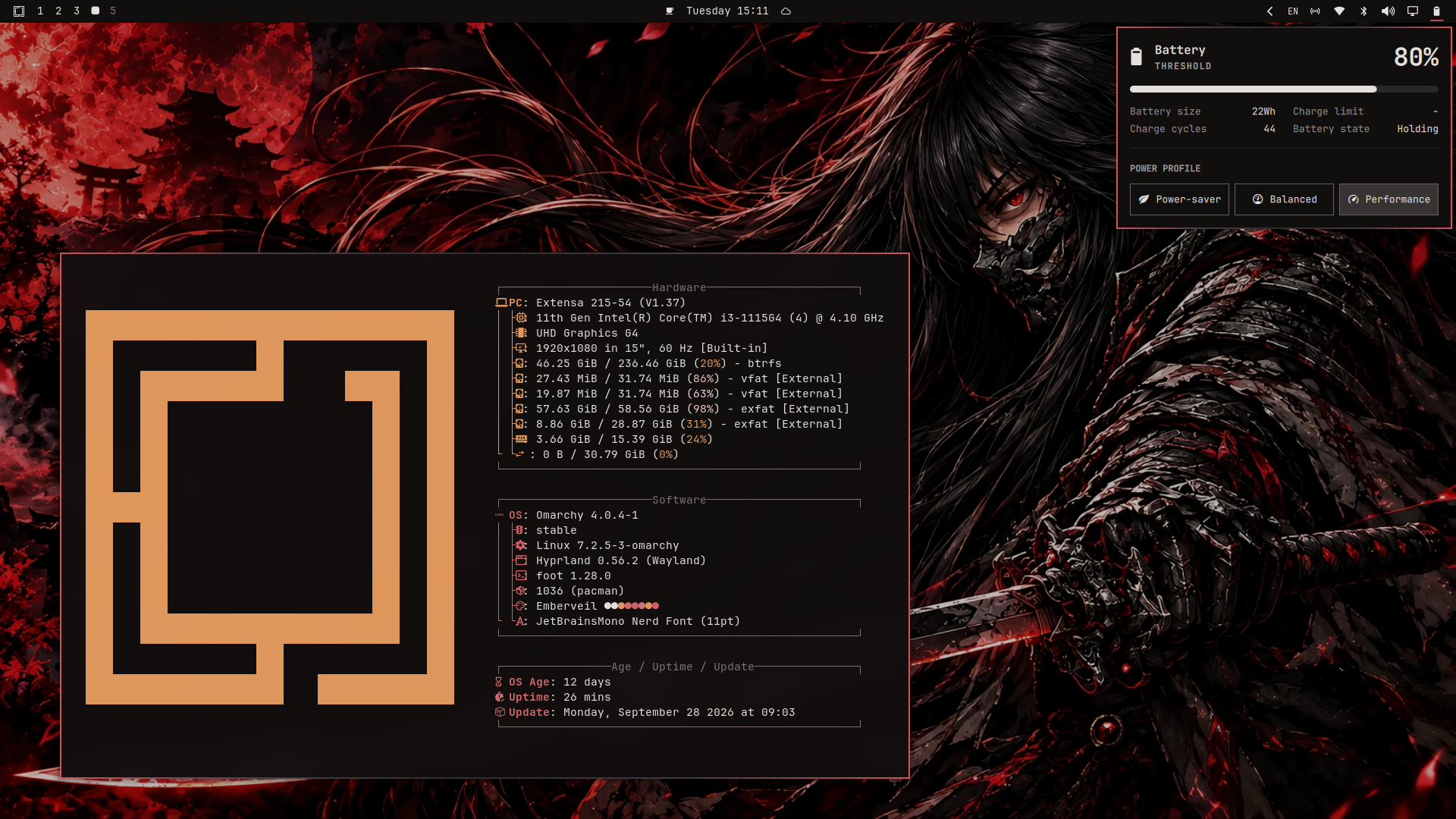
A dark Omarchy theme built around a single ember accent on a warm near-black base. The active window border carries a gradient that fades to the background at the centre of the edge, so windows read as lit at the corners and dim in the middle rather than sitting inside a flat outline.
Palette
| Role | Colour |
|---|---|
| Background | #110e0e |
| Foreground | #e4e0dd |
| Accent (ember) | #d4545c |
| Selection bg | #d4545c |
| Selection fg | #110e0e |
| Muted | #7d7472 |
| Dark surface | #3a2427 |
The 16-colour ANSI ramp is defined in colors.toml and is what terminals,
Zed, btop and the shell all read, so editing colors.toml updates the whole
desktop. Every bright_* slot is genuinely lighter than its regular_*
counterpart so that bold text and TUI key hints stay legible. Neovim is the one
exception: it uses Ashen, see Neovim below.
Border gradient
The gradient lives in one field and drives both Hyprland windows and the shell's popups:
hyprland_active_border = "#d4545c #443c44 #2e2a30 #443c44 #d4545c"Dropping the trailing deg angle gives the horizontal default. 90deg is
vertical, 45deg diagonal. Note that Hyprland maps a linear gradient across the
whole window box, so 45deg and 0deg skew on non-square windows; the
horizontal default is the one that stays balanced across aspect ratios.
The middle stops are a cool grey rather than a darker red on purpose: the wallpaper is a very red image, and red-on-red left the midtones of the border at a contrast of ~1.1 against it (effectively invisible). The grey lifts them to ~1.4-1.7 so the whole ramp reads while still fading in the middle.
Background
backgrounds/BG2.webp is a red-and-black character illustration whose visible
colour sits almost entirely at hue 356°, the same hue as the ember accent. It
is veiled (brightness ×0.72, saturation ×0.88) so the image's red does not
compete with the UI accent, and stored as WebP q88 to keep the repository
light (0.77 MB, down from 9.26 MB).
Files
| File | Applies to |
|---|---|
colors.toml | source of truth, drives every template below |
btop.theme | btop (regenerated from colors.toml) |
hyprland.conf | window/decoration settings and colours |
hyprlock.conf | lock screen colours |
neovim.lua | Neovim, sets colorscheme = "ashen" |
foot.ini | foot, the default Omarchy terminal |
alacritty.toml, ghostty.conf, kitty.conf, warp.yaml | other terminals |
gtk.css | GTK4 / Adwaita apps |
vencord.theme.css | Discord (Vencord) |
emberveil.zed.json | Zed |
walker.css, wofi.css, swayosd.css, waybar.css, mako.ini | shell surfaces |
backgrounds/BG2.webp | desktop background |
preview.png | preview shown in the theme switcher |
Files that omarchy theme install does not copy
Omarchy deliberately drops a few files when installing a theme from a git repository, because they can name a program to launch. These files are in the repository for you to copy by hand, but installing the theme will not put them on your machine:
| File | Why it is skipped |
|---|---|
neovim.lua | *.lua is dropped (Neovim loads it at startup) |
alacritty.toml, ghostty.conf, kitty.conf, foot.ini | terminal configs name the program to launch |
Everything else — colors.toml, backgrounds/, preview.png,
hyprland.conf, hyprlock.conf, the CSS files, btop.theme,
chromium.theme, icons.theme and the Zed theme — is installed normally and
needs no manual step.
If you want the skipped ones, the instructions are below.
Neovim
Emberveil does not ship its own editor colorscheme. Neovim uses ashen.nvim, a warm ember-toned dark theme, which pairs with the ember accent without a second palette to keep in sync.
neovim.lua is not installed automatically (see the note above). To get
Ashen, add the plugin and set the colorscheme in your own LazyVim config.
For LazyVim, create ~/.config/nvim/lua/plugins/neovim.lua:
return {
  { "ficcdaf/ashen.nvim" },
  {
    "LazyVim/LazyVim",
    opts = {
      colorscheme = "ashen",
    },
  },
}
Restart Neovim afterwards. If Ashen does not appear, run :Lazy sync once.
If you would rather have a colorscheme generated straight from colors.toml,
skip Ashen entirely and delete neovim.lua from your copy of the theme —
Omarchy then regenerates it from the palette on every omarchy theme set.
Terminals
The terminal configs are not installed automatically. Each one is a drop-in file you copy to the right place. You only need the one for the terminal you use.
foot (Omarchy's default)
foot.ini is a complete standalone config: the full Emberveil palette plus a
translucent blurred background, an 11pt JetBrainsMono Nerd Font, a beam cursor
and 10 000 lines of scrollback.
THEME=~/.config/omarchy/themes/emberveil
mkdir -p ~/.config/foot
cp "$THEME/foot.ini" ~/.config/foot/foot.ini
omarchy restart terminal
Because a theme-supplied foot.ini is never regenerated, editing
colors.toml will no longer update foot — the palette in foot.ini is a
copy. If you change the palette, mirror it in the [colors-dark] section of
your foot.ini too.
Prefer to keep foot tied to the palette? Delete foot.ini from your copy of
the theme. Omarchy then regenerates it from colors.toml on every
omarchy theme set, and you can still get the look by adding just the
presentation settings to ~/.config/foot/foot.ini:
[main]
include=~/.local/state/omarchy/toggles/foot.ini
include=~/.local/state/omarchy/current/theme/foot.ini
term=xterm-256color
font=JetBrainsMono Nerd Font:size=11
pad=14x14
initial-window-mode=windowed
workers=0

[colors-dark]
blur=yes
alpha=0.95

[scrollback]
lines=10000
multiplier=7.0

[cursor]
style=beam
blink=yes
This second form is the more flexible one: colours stay generated from
colors.toml, and only the presentation is yours.
Other terminals
THEME=~/.config/omarchy/themes/emberveil

# Alacritty
mkdir -p ~/.config/alacritty && cp "$THEME/alacritty.toml" ~/.config/alacritty/

# Ghostty
mkdir -p ~/.config/ghostty && cp "$THEME/ghostty.conf"    ~/.config/ghostty/config

# Kitty
mkdir -p ~/.config/kitty && cp "$THEME/kitty.conf"        ~/.config/kitty/

# Warp
mkdir -p ~/.config/warp-terminal/themes && cp "$THEME/warp.yaml" ~/.config/warp-terminal/themes/
Look'n'feel
Omarchy does not source hyprland.conf automatically. Hyprland reads the
generated hyprland.lua, which already carries the border gradient, so the
theme alone gives you the palette and the border. The rest of the look'n'feel —
gaps, blur, shadows, dimming, tearing — is in hyprland.conf and has to be
applied by you.
The settings it carries are:
| Setting | Value |
|---|---|
| Gaps | gaps_in = 4, gaps_out = 8 |
| Border size | border_size = 2 |
| Blur | size = 10, passes = 2, new_optimizations = true |
| Shadow | range = 16, color = rgba(00000052) |
| Motion blur | enabled |
| Dim inactive | dim_inactive = true, dim_strength = 0.5 |
| Tearing | allow_tearing = true |
| Layout | dwindle |
| Rounding | not forced (Omarchy's default) |
You have two ways to apply them.
Option A — source the file. Add this to the bottom of
~/.config/hypr/hyprland.lua, after the Omarchy requires:
source = (os.getenv("HOME") .. "/.config/omarchy/themes/emberveil/hyprland.conf")Option B — copy the settings. Add them to
~/.config/hypr/looknfeel.lua, which Omarchy already loads for you. This is
the tidier option because it keeps your own config self-contained:
hl.config({
  general = {
    allow_tearing = true,
    gaps_in = 4,
    gaps_out = 8,
    border_size = 2,
  },
  decoration = {
    motion_blur = { enabled = true },
    blur = {
      enabled = true,
      size = 10,
      passes = 2,
      new_optimizations = true,
    },
    shadow = {
      enabled = true,
      range = 16,
      color = "rgba(00000052)",
    },
    dim_inactive = true,
    dim_strength = 0.5,
  },
})
Then reload Hyprland:
hyprctl reloadLock screen. hyprlock.conf only defines colours. Source it from your own
hyprlock config to get a matching lock screen:
source = ~/.config/omarchy/themes/emberveil/hyprlock.confInstall
omarchy theme install emberveilOr from the URL directly:
omarchy theme install https://github.com/amaurisd97/omarchy-emberveil-theme.gitThen apply it:
omarchy theme set "Emberveil"Cycle through the bundled background with omarchy theme bg next.
Credits
- Palette direction and the original file layout come from Vengeance by Grey-007.
- Neovim support uses ashen.nvim as a separate dependency, not bundled here.
- The wallpaper was generated with AI image tools (ChatGPT and Gemini) and is released under the same MIT license as the theme.
License
MIT. See LICENSE, and NOTICE for the credits that go with it.