color palette
#2D0A22
#FF8EC8
#FF1493
#FF69B4
#FF1493
#2D0A22
#3D0A20
#FF1493
#FF69B4
#FF85C1
#FF1493
#F50057
#F06292
#FFD6E8
#5A1030
#FF4DB8
#FF85C1
#FFB3D9
#FF4DB8
#FF69B4
#F48FB1
#FFE4F0
preview
readme
Omarchy Barbie Theme
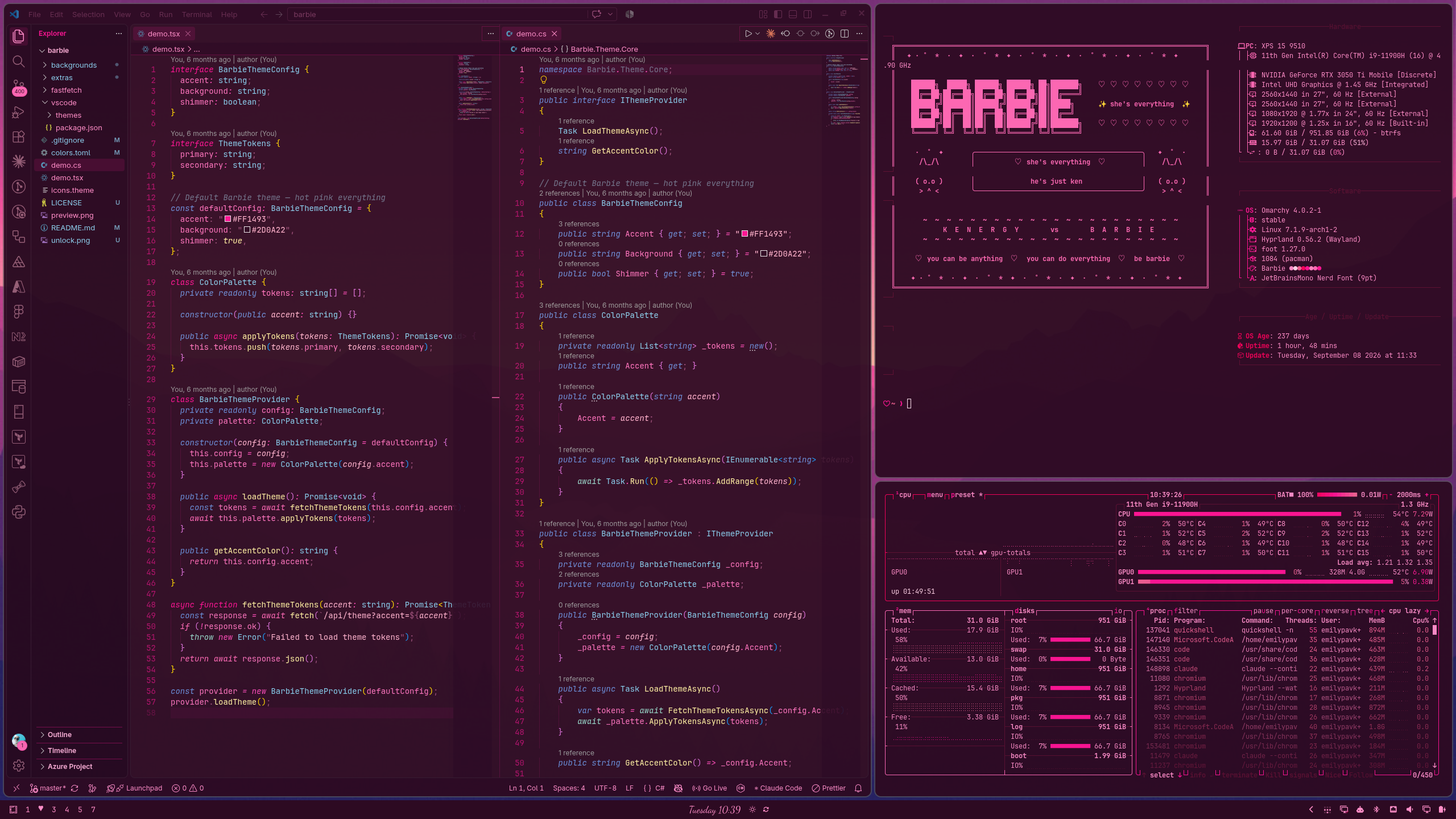
A Barbie-inspired dark theme for Omarchy with deep violet-pink backgrounds, hot pink accents, sky blue class names, royal blue modifiers, and pastel yellow method names. Includes a matching VS Code theme.
Install
omarchy theme install https://github.com/BBIEPavkov/omarchy-barbie-themeThen apply it:
omarchy theme set barbieRequires Omarchy 4 (Quattro) and the Yaru-magenta icon theme.
Light Mode
For daytime, use the light Omarchy Barbie Malibu theme: pastel pink backgrounds with deep berry text and ocean blue highlights.
omarchy theme install https://github.com/BBIEPavkov/omarchy-barbie-malibu-theme
omarchy theme set barbie-malibu
Switch between the two any time with omarchy theme set barbie and omarchy theme set barbie-malibu.
Colors
| Role | Color |
|---|---|
| Background | #2D0A22 (deep violet-pink) |
| Foreground | #FF8EC8 (bold pink) |
| Accent | #FF1493 (hot pink) |
| Cursor | #FF69B4 (hot pink) |
VS Code Theme
A matching VS Code theme is included in the vscode/ folder.
Install manually:
ln -s ~/.config/omarchy/themes/barbie/vscode ~/.vscode/extensions/omarchy-barbie-themeThen reload VS Code and select Omarchy Barbie from the theme picker (Ctrl + Shift + P → Preferences: Color Theme).
Syntax highlighting includes:
| Element | Color |
|---|---|
Modifiers (public, private, async) | Royal blue |
| Class / type names | Sky blue |
| Method names | Pastel yellow |
| Strings | Light pink |
| Numbers | Pastel yellow |
Control flow (await, return) | Mint |
| Comments | Faded pink, italic |
Obsidian
Omarchy themes Obsidian automatically. This theme adds heart bullet points, a heart before each top-level heading, pink highlights, and dividers made of hearts.
Discord
For Vencord or Vesktop: copy vencord.theme.css into Vencord's themes folder, then turn it on under Settings → Themes.
cp ~/.config/omarchy/themes/barbie/vencord.theme.css ~/.config/Vencord/themes/barbie.theme.cssFastfetch (Terminal ASCII Art)
This theme includes a Barbie ASCII art header that displays when you open a terminal.
To set it up, copy the fastfetch config files:
cp ~/.config/omarchy/themes/barbie/fastfetch/config.jsonc ~/.config/fastfetch/config.jsoncThen add fastfetch to your ~/.bashrc:
echo "fastfetch" >> ~/.bashrcNote: This will replace your existing fastfetch config. Back it up first if you want to keep it:
cp ~/.config/fastfetch/config.jsonc ~/.config/fastfetch/config.jsonc.bak
Extras
The theme sets colors, wallpapers, a hot pink window border, and the boot screen logo. Everything else is optional and installed by a script that asks before each piece:
~/.config/omarchy/themes/barbie/extras/install.sh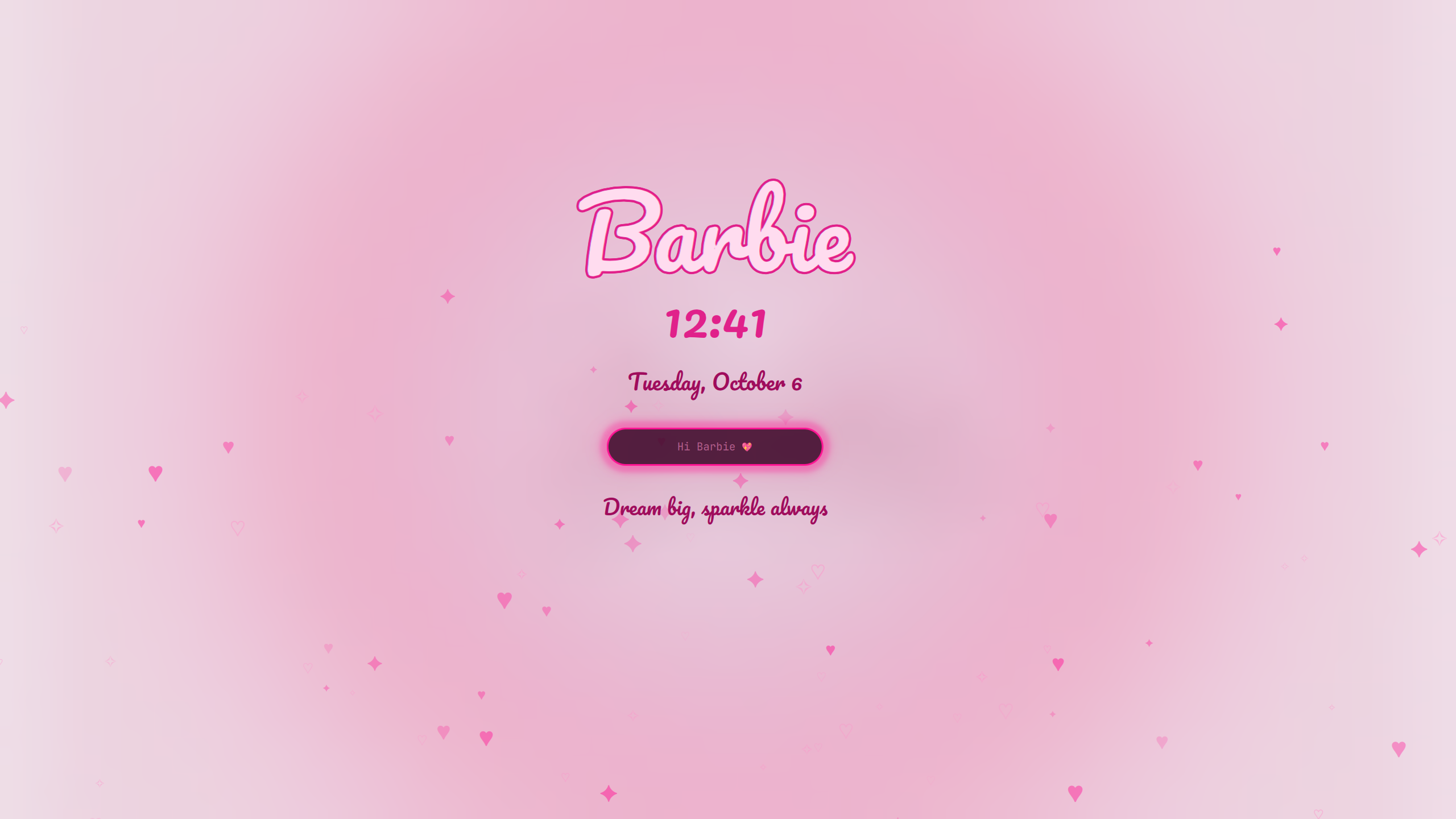
| Extra | What you get |
|---|---|
| Lock screen | Shimmering Barbie logo, script clock and date, floating hearts and sparkles, heart password dots, a sparkle trail and click bursts, sassier messages on each wrong password, confetti on unlock. The layout drifts slowly to avoid burn-in. |
| Bar | Clock in a script font, a ♥ on the current workspace, and a slightly taller bar |
| Popups | Volume and brightness levels shown as hearts, and a ♥ on every notification |
| Cursor | Hot pink cursor (a recolor of Catppuccin Cursors, GPL-2.0) |
| Windows | Rounded corners, a soft pink glow around the focused window, slightly see-through unfocused windows, and bouncy open/close animations |
| Terminal prompt | Pink ♥ before the folder name, 💔 after a failed command (Starship) |
| Launcher | "Where to, Barbie…" as the menu prompt |
| Boot and login screens | A BarbieOS logo on black for the boot password screen and the login screen (asks for your password) |
To undo all of it and get Omarchy's built-ins back:
~/.config/omarchy/themes/barbie/extras/uninstall.shomarchy refresh hyprland resets ~/.config/hypr/hyprland.lua, which drops the cursor and window extras. Run install.sh again and say yes to those two to bring them back.
To customize the lock screen, edit ~/.config/omarchy/plugins/emilypavkov.lock/LockView.qml (messages, number of hearts) or Service.qml (wrong-password messages), then run omarchy restart shell.
Wallpapers
Cycle through them with Super + Ctrl + Space or omarchy theme bg next. Add your own to ~/.config/omarchy/backgrounds/barbie/; that folder survives theme updates.
Photos from Unsplash, free to use under the Unsplash License:
| File | Photographer |
|---|---|
pink-blossoms.jpg | Mi Min |
pink-clouds.jpg | Xinyi Wen |
pink-sky-bridge.jpg | Anders Jildén |
blossom-burst.jpg | Anita Austvika |
blossoms-blue-sky.jpg | AJ |
cherry-branch.jpg | Tsz Chung Cheng |
lavender-moonrise.jpg | Dan LeFebvre |
misty-pink-ridges.jpg | Arno Senoner |
pink-clouds-moon.jpg | John Thomas |
pink-clouds-peaks.jpg | Marsumilae |
pink-sky-snowy-peaks.jpg | Tory Hoffman |
purple-mountain-sunset.jpg | Олег Мороз |
Fonts
The lock screen bundles Pacifico and the bar clock bundles Dancing Script, both under the SIL Open Font License (see each plugin's OFL.txt). The plugins are based on Omarchy's built-in ones (MIT).
Disclaimer
Barbie is a trademark of Mattel, Inc. This is an unofficial fan theme and is not affiliated with or endorsed by Mattel.